Atmosic Secure Journal Tool
Overview
The secure journal is a dedicated block of RRAM that has the property of being a write-once, append-only data storage area that replaces traditional OTP memory. This region is located near the end of the RRAM storage array at 0x8F800 – 0x8FEEF (1776 bytes).
The secure journal region contains variable-length TLV (Type, Length, Value) data tuples.
The secure journal may contain:
Bluetooth Device BD Address (can be configured by customers)
Per-chip or per-board calibration data (can be configured by customers, or through Tools, such as MPTools)
ATE test information at the chip test/assembly (cannot be configured by customers)
The secure journal is intended to be programmed during manufacturing. The application firmware can only read tag data stored in the journal; it cannot update or append data.
The secure journal’s protection properties are activated during chip test/assembly via an OTP bit setting. This setting is configured for all production chips.
Theory of Operation
The secure journal data updates are controlled by a secure counter (address ratchet). The counter determines the next writable location at an offset from the start of the journal. An offset greater than the counter value is writable while any offset below or equal to the counter is locked from updates. The counter can only increment monotonically and cannot be rolled back. This provides the immutability of OTP as well as the flexibility to append new data items or override past items using a find the latest TLV search.
Using the following as an example, the secure journal start address is at 0x8F800, and the ratchet is currently set to 4. This data between the start of the secure journal and the ratchet value (non-inclusive) is locked, i.e., 0x8F800-0x8F803.

Figure 1 - Secure Journal Example
To append new data, an additional byte can be written at the ratchet position, and the ratchet is incremented by 1 (now becomes 5). This locks down 1 additional byte of the secure journal.
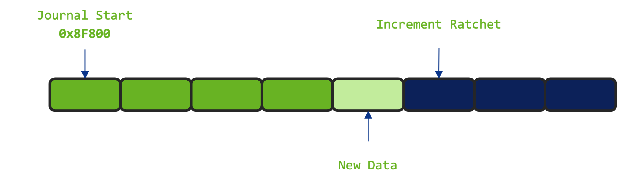
Figure 2 - Add New Data to Secure Journal
Memory between the start of the secure journal and the ratchet is now write-protected (0x8F800-0x8F804). RRAM memory after the new ratchet value can still be freely programmed. Since the ratchet counter value cannot be rolled back, all data before the ratchet cannot be updated.
A new tag or an override to an existing tag can be added to the journal without committing it (i.e., incrementing the ratchet). The tag is non-volatile; however, it is not permanent due to the position of the ratchet. This is useful for testing purposes without having to permanently add and eventually exhaust the available space in the journal. This is only recommended for development testing and should not be used in the final end product. Manufacturing processes should install and increment the ratchet to protect data. See the “SDK Tooling” section for additional information.
Tag Types
The journal contains two classes of tags: Overridable and Immutable. The main difference is a tag header flag that denotes a tag as being immutable (i.e., locked).
SDK Tooling
The Secure Journal is intended to be read-only during application execution. Zephyr standard west tooling has been enhanced to include support for manipulating Secure Journal. west secjrnl... extensions can be used to dump contents, get tag data, erase, append a new tag, or create a local secure journal copy.
Python Requirements
The following setup procedures are not required when using atmoautil (see OpenAir Utility).
The Atmosic Secure Journal Tool requires Python packages of Zephyr.
To install with the Zephyr requirements file:
pip install -r zephyr/scripts/requirements.txt
If needed, create a symbolic link or use a Python virtual environment:
For Linux:
sudo ln -s $(which python3) /usr/bin/python
For Windows:
mklink "C:\Path\To\Python\python3.exe" "C:\Path\To\Python\python.exe"
Note
On Windows:
you can use
where python3to locate the path of the Python executable.Ensure that the symlink or Python installation directory is included in the system PATH environment variable, or place the symlink in a directory that is already in the PATH.
Type in west secjrnl --help to know the list of supported options, as shown below:
user@domain:~/zephyrproject-05-22-2025$ west secjrnl --help
usage: west secjrnl [-h]
     {dump,get,erase,get_ratchet,append,ratchet_jrnl,create}
                   ...
Interface with secure journal on supported chips. Allows users to manage the
secure journal through a variety of sub commands.

positional arguments:
  {dump,get,erase,get_ratchet,append,ratchet_jrnl,create}
                        sub-command to run
    dump                Dump all TLVs from the secure journal
    get                 Get individual TLV from secure journal
    erase               Erase all non-ratcheted TLVs from the secure journal
    get_ratchet         Return secure ratchet index
    append              Appends a single TLV to the secure journal
    ratchet_jrnl        Increment secure ratchet index
    create              Build a local secure journal binary file

options:
  -h, --help            show this help message and exit
Required parameters:
Note
--jlink Specify if using a J-Link interface. If omitted, the FTDI interface is assumed.
--dl Specify if using a Download Board (DL) interface.
Creating a local binary copy of the Secure Journal
Pulling the content of the secure journal into a local file can be performed by running the following command:
west secjrnl create --device <serial> --jlink --board <board> -o <outfile>
This will pull the data from the device and store it in a local file ‘<outfile>’.
Dumping Secure Journal
To dump all the TLV tags located in the secure journal:
west secjrnl dump --device <DEVICE_ID> --jlink --board <BOARD>
west secjrnl dump --device <DEVICE_ID> --dl --board <BOARD>
Here is a sample:
west secjrnl dump --device 900038948 --jlink --board ATMEVK-3430e-YQN-5
Using ATM OpenOCD '/data/user/zephyrproject_05_08_2025/modules/hal/atmosic_lib/tools/openocd/bin/Linux/openocd'
['ATM34xx-5', 'ATM34xx-5/no_TZ']
@0007 ATE [V][L][!E] data: [00 00 00 00 00 00 00 00 00 00 00 00 00 00 00 00 8f e4 29 10 02 00 07 00 00 00 00 00]
@0026 CHIP_INFO [V][L][!E] data: [0d 00 06 06 02 19 00 00 01]
@0032 RIF_CAL [V][L][!E] data: [a1 1d 00 00 d8 05 00 00 9f 80 25 02 4f 80 12 01 13 00 00 00 c3 c9 16 00 20 08 00 00]
@0051 MDM_CAL [V][L][!E] data: [18 cd 0c 28 01 02 00 00 16 11 18 80 e0 a7 00 00 d1 6b 00 00]
@0068 tag:(c2) [V][L][!E] data: [fc 92 16 0b]
@006f tag:(c3) [V][L][!E] data: [b9 18 e5 03 db d6 1f 00 52 84 20 05 db e6 1f 00]
@0082 tag:(c4) [V][L][!E] data: [00 80 26 00 7d c5 0a 00 55 c1 0d 00 7e c0 10 00 43 c0 13 00 9d c8 0a 00 6b c2 0d 00 b8 c0 10 00 57 c0 13 00 4f fd 00 00 c3 fd 00 00 01 fe 00 00 1f fe 00 00]
@00b9 tag:(01) [V][!L][!E] data: [02 10 84 6b 69 7c]
@00c2 tag:(de) [V][!L][!E] data: [64 61 74 61]
Appending a Tag to the Secure Journal
The secure journal uses a find latest search algorithm to allow overrides. If the passed tag should NOT be overridden in the future, add the flag --locked to the append command. See the following section for more information regarding locking a tag.
To append a new tag to the secure journal:
west secjrnl append --device <DEVICE_ID> --jlink --board <BOARD> --tag <tag_id> --data <tag_data>
tag_idappropriate tag ID (Ex:0xde)tag_datathe data for the tag. This is passed as a string with ASCII-only characters (0-127). To pass raw byte values format it like so:\xde\xad\xbe\xef. As such,--data "data"will result in the same output as--data "\x64\x61\x74\x61".
Data Format Examples
The --data parameter supports ASCII text and escape sequences for binary data:
ASCII text:
--data "hello world"(characters 0-127 only)Binary bytes:
--data "\xde\xad\xbe\xef"(any byte value 0-255)Mixed data:
--data "text\x00\xfabinary"(ASCII text with binary bytes)Special characters:
--data "line1\nline2\ttab"(newlines, tabs, etc.)
Important
Use
\xabformat for hex bytes, not\0xab. Each byte is represented as\xfollowed by exactly two hex digits.ASCII characters (0-127) can be typed directly. Non-ASCII characters must use
\xescape sequences.Example: Use
\xe9instead of typingédirectly to avoid encoding issues.
Complete Example
Here’s a complete example showing how mixed ASCII text and binary data is processed:
west secjrnl append --device <DEVICE_ID> --jlink --board <BOARD> --tag 0x15 --data "text\x00\x01binary\n" --dry-run
This command will result in the following output:
@00b9 tag:(15) [V][!L][!E] data: [74 65 78 74 00 01 62 69 6e 61 72 79 0a]
Data breakdown:
- text → 74 65 78 74 (ASCII: ‘t’, ‘e’, ‘x’, ‘t’)
- \x00 → 00 (null byte)
- \x01 → 01 (binary byte value 1)
- binary → 62 69 6e 61 72 79 (ASCII: ‘b’, ‘i’, ‘n’, ‘a’, ‘r’, ‘y’)
- \n → 0a (newline character)
Example with byte values:
west secjrnl append --device <DEVICE_ID> --jlink --board <BOARD> --tag 0x16 --data "abcd\xfa\xff" --dry-run
Results in: [61 62 63 64 fa ff] (ASCII ‘abcd’ + bytes 250, 255)
Note that passing --dry-run to append operation only prints the secure journal, but does not write the data into secure journal.
Note
BD Address Configuration
When setting a BD address in the secure journal, the byte sequence must be reversed from the standard representation. The BD address uses tag ID 0x1.
Tag ID:
0x1(BD address)Standard BD Address Format:
AA:BB:CC:DD:EE:FFSecure Journal Format:
\xFF\xEE\xDD\xCC\xBB\xAA(reversed byte order)
Example: If your intended BD address is 12:34:56:78:9A:BC, you must provide it as:
west secjrnl append --device <DEVICE_ID> --jlink --board <BOARD> --tag 0x1 --data "\xBC\x9A\x78\x56\x34\x12"
This reversal is required because the secure journal stores the BD address in little-endian byte order, while the standard representation uses big-endian format.
Note
The append command does NOT increment the ratchet. The newly appended tag is still unprotected from erasing.
Locking Down a Tag
The secure journal provides a secure method of storing data while still providing options to update the data if needed. However, there are key data entries that should never be updated across the life of the device (e.g. UUID).
This support is provided by software and can be enabled for a tag by passing the --locked to the command when appending a new tag.
It is important to understand, that once a tag is locked (and ratcheted), the specific tag can never be updated in the future - Appending a new tag of the same value will be ignored.
Erasing Non-ratcheted Data From the Secure Journal
Appended tags are not ratcheted down. This allows for prototyping with the secure journal before needing to lock down the TLVs. The secure journal has limited erasing capabilities. Due to the nature of the security ratchet, only non-ratcheted data can be erased. Erase should only be used in testing to remove the test values. All data in production should be secured by using the ratchet mechanism.
To support prototyping, you can erase non-ratcheted data easily through:
west secjrnl erase --device <DEVICE_ID> --jlink --board <BOARD>
Ratcheting Secure Journal
This will list the non-ratcheted tags and confirm that you want to ratchet the tags. Confirm by typing ‘yes’.
To ratchet data, run the command:
west secjrnl ratchet_jrnl --device <DEVICE_ID> --jlink --board <BOARD>
Note
This process is non-reversible. Once ratcheted, that region of the secure journal cannot be modified.