MCUboot and Secure Boot
Overview
MCUboot is an open-source secure bootloader for 32-bit microcontrollers. ATM33/e and ATM34/e use this bootloader to support OTA (Over-The-Air) firmware updates and secure boot functionality.
Secure Boot is a verification mechanism provided by MCUboot that ensures only authenticated firmware is executed. This is achieved by verifying digital signatures before booting. The ECDSA P-256 curves have been validated and optimized for Atmosic SoC for improved performance and security. By default, ECDSA P-256 is used when building for Atmosic EVKs.
MCUboot provides the following key capabilities:
Bootloader functionality: Manages the boot process and image validation
DFU support: Enables Dynamic Firmware Update (over-the-air or serial) with image validation and upgrade services
Secure Boot: Verifies firmware authenticity using ECDSA signatures
Image signing and verification: Ensures firmware integrity and authenticity
Upgrade services: Validates images for data corruption and performs updates using swap or overwrite options
For more details on MCUboot, please refer to https://www.mcuboot.com/ and https://docs.mcuboot.com/design.html.
Building and Using MCUboot
MCUboot is required when OTA is enabled. One of the main functions of MCUboot is to provide upgrade services by validating images (to check for data corruption) and performing updates using swap or overwrite options.
Refer to the instructions in the board documentation on building MCUboot with your application.
MCUboot RRAM Partitioning
When using MCUboot, RRAM partitioning can be seen using the layout_info file generated in the application build folder.
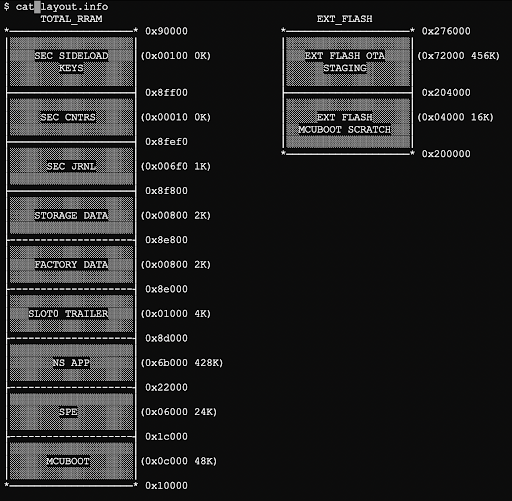
Figure 1 - MCUboot RRAM Partitioning
MCUboot Boot Flow
The MCUboot device boot flow is shown in Figure 2.
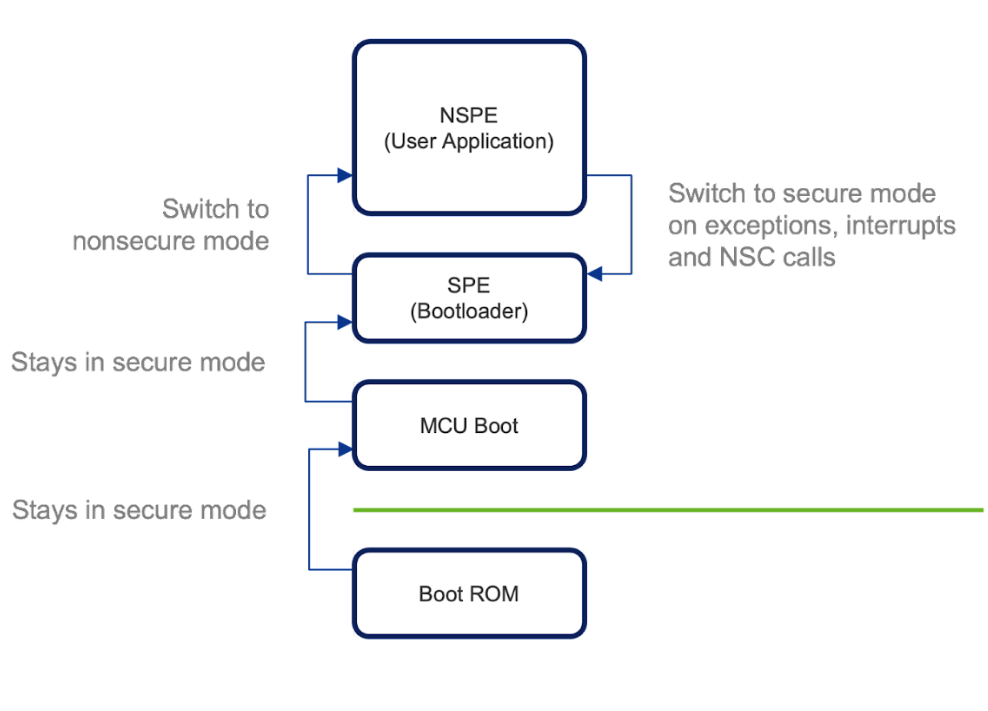
Figure 2 - MCUboot Device Boot Flow
Update Overwrite
The normal upgrade procedure with MCUboot will safely swap images using a swap area, which allows for updates to be reverted if they are not successful.
This behavior can be disabled by building in overwrite-only mode. The following options must be added to both the MCUboot build and the application build:
-DMCUBOOT_BOOTLOADER_MODE_OVERWRITE_ONLY=y -DDTS_EXTRA_CPPFLAGS="-DATM_MCUBOOT_SWAP_WITH_OFFSET=0;-DATM_MCUBOOT_SCRATCH_SIZE=0"
Secure Boot
Secure boot is a verification mechanism for ensuring that the new firmware is from a trusted origin. This is achieved by signing images with an ECDSA signature.
MCUboot enables secure boot by default by enabling the BOOT_SIGNATURE_TYPE_ECDSA_P256 Kconfig option.
When signing images, MCUboot uses a well-known development private/public key as defined in bootloader/mcuboot/root-ec-p256.pem file. Given that this is a well-known key in open source, it should not be used in production builds. The Kconfig option MCUBOOT_SIGNATURE_KEY_FILE can be used to specify application-specific private/public keys. This build option must be passed to both the MCUboot and application builds.
Key Generation
To generate a key file for signing firmware images, use bootloader/mcuboot/scripts/imgtool.py, which is part of MCUboot.
Generating Public & Private Key
The key is used to sign the new image, and it needs to be generated in a secure environment.
To generate a new ECDSA P-256 key file, navigate to bootloader/mcuboot/scripts folder and run the following command:
imgtool.py keygen -k <KEY_STORAGE_PATH>/my_ecdsa_p256_key.pem -t ecdsa-p256
The newly generated file will be in the <KEY_STORAGE_PATH> folder.
Public/private keys can be derived using the commands below:
imgtool.py getpub -k my_ecdsa_p256_key.pem
imgtool.py getpriv -k my_ecdsa_p256_key.pem
Public Key
The public key is used to verify the signed image. The public key will be embedded in the MCUboot image during compilation.
Key Configuration
To specify the generated .pem key file for signing, set the -DCONFIG_BOOT_SIGNATURE_KEY_FILE="<key_file_path>" option when building both the MCUboot and the application (not needed for the SPE). If a key file is not explicitly specified, MCUboot uses its default test keys, which should not be used in production for security reasons.
Image Signing
Image signing is done during the build process by generating a signature pair (r, s) using:
A random number
Selected elliptic curve domain parameters
Private key
Image hash (SHA256)
The build process combines secure and nonsecure binaries into a single image before signing.
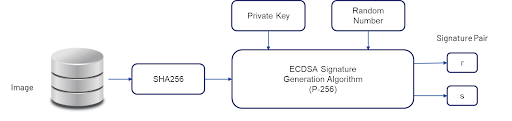
Figure 3 - Image Signing Build Process
Image Verification
To verify the image, MCUboot uses the signature pair and public key stored in the image.
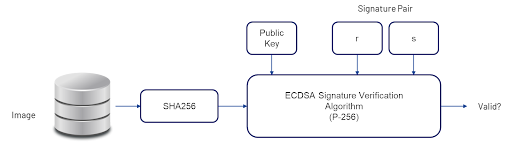
Figure 4 - Image Verification Process
Image Format
The final image generated from the build process (zephyr.signed.bin) has the following format (without Padding):

Figure 5 - Image Format
Image zephyr.signed.bin in the build folder follows the above format, but does not include padding and the image trailer.
Image Header
/** Image header.  All fields are in little endian byte order. */
STRUCT_PACKED image_header {
    uint32_t ih_magic;
    uint32_t ih_load_addr;
    uint16_t ih_hdr_size;           /* Size of image header (bytes). */
    uint16_t ih_protect_tlv_size;   /* Size of protected TLV area (bytes). */
    uint32_t ih_img_size;           /* Does not include header. */
    uint32_t ih_flags;              /* IMAGE_F_[...]. */
    struct image_version ih_ver;
    uint32_t _pad1;
};
Note
Refer to bootloader/mcuboot/boot/bootutil/include/bootutil/image.h
TLV (Type-Length-Value)
/** Image TLV header.  All fields in little endian. */
STRUCT_PACKED image_tlv_info {
    uint16_t it_magic;
    uint16_t it_tlv_tot;  /* size of TLV area (including tlv_info header) */
};

/** Image trailer TLV format. All fields in little endian. */
STRUCT_PACKED image_tlv {
    uint16_t it_type;   /* IMAGE_TLV_[...]. */
    uint16_t it_len;    /* Data length (not including TLV header). */
};
Note
Refer to bootloader/mcuboot/boot/bootutil/include/bootutil/image.h
Image Trailer
The image trailer structure is defined as follows:
 0                   1                   2                   3
 0 1 2 3 4 5 6 7 8 9 0 1 2 3 4 5 6 7 8 9 0 1 2 3 4 5 6 7 8 9 0 1
+-+-+-+-+-+-+-+-+-+-+-+-+-+-+-+-+-+-+-+-+-+-+-+-+-+-+-+-+-+-+-+-+
~                                                               ~
~    Swap status (BOOT_MAX_IMG_SECTORS * min-write-size * 3)    ~
~                                                               ~
+-+-+-+-+-+-+-+-+-+-+-+-+-+-+-+-+-+-+-+-+-+-+-+-+-+-+-+-+-+-+-+-+
|                 Encryption key 0 (16 octets) [*]              |
|                                                               |
+-+-+-+-+-+-+-+-+-+-+-+-+-+-+-+-+-+-+-+-+-+-+-+-+-+-+-+-+-+-+-+-+
|                    0xff padding as needed                     |
|  (BOOT_MAX_ALIGN minus 16 octets from Encryption key 0) [*]   |
+-+-+-+-+-+-+-+-+-+-+-+-+-+-+-+-+-+-+-+-+-+-+-+-+-+-+-+-+-+-+-+-+
|                 Encryption key 1 (16 octets) [*]              |
|                                                               |
+-+-+-+-+-+-+-+-+-+-+-+-+-+-+-+-+-+-+-+-+-+-+-+-+-+-+-+-+-+-+-+-+
|                    0xff padding as needed                     |
|  (BOOT_MAX_ALIGN minus 16 octets from Encryption key 1) [*]   |
+-+-+-+-+-+-+-+-+-+-+-+-+-+-+-+-+-+-+-+-+-+-+-+-+-+-+-+-+-+-+-+-+
|                      Swap size (4 octets)                     |
+-+-+-+-+-+-+-+-+-+-+-+-+-+-+-+-+-+-+-+-+-+-+-+-+-+-+-+-+-+-+-+-+
|                    0xff padding as needed                     |
|        (BOOT_MAX_ALIGN minus 4 octets from Swap size)         |
+-+-+-+-+-+-+-+-+-+-+-+-+-+-+-+-+-+-+-+-+-+-+-+-+-+-+-+-+-+-+-+-+
|   Swap info   |  0xff padding (BOOT_MAX_ALIGN minus 1 octet)  |
+-+-+-+-+-+-+-+-+-+-+-+-+-+-+-+-+-+-+-+-+-+-+-+-+-+-+-+-+-+-+-+-+
|   Copy done   |  0xff padding (BOOT_MAX_ALIGN minus 1 octet)  |
+-+-+-+-+-+-+-+-+-+-+-+-+-+-+-+-+-+-+-+-+-+-+-+-+-+-+-+-+-+-+-+-+
|   Image OK    |  0xff padding (BOOT_MAX_ALIGN minus 1 octet)  |
+-+-+-+-+-+-+-+-+-+-+-+-+-+-+-+-+-+-+-+-+-+-+-+-+-+-+-+-+-+-+-+-+
|                    0xff padding as needed                     |
|         (BOOT_MAX_ALIGN minus 16 octets from MAGIC)           |
+-+-+-+-+-+-+-+-+-+-+-+-+-+-+-+-+-+-+-+-+-+-+-+-+-+-+-+-+-+-+-+-+
|                       MAGIC (16 octets)                       |
|                                                               |
+-+-+-+-+-+-+-+-+-+-+-+-+-+-+-+-+-+-+-+-+-+-+-+-+-+-+-+-+-+-+-+-+

[*]: Only present if the encryption option is enabled (MCUBOOT_ENC_IMAGES).
Note
Refer to bootloader/mcuboot/boot/bootutil/src/bootutil_priv.h
The MAGIC (16 octets) field refers to:
const union boot_img_magic_t boot_img_magic = {
    .val = {
        0x77, 0xc2, 0x95, 0xf3,
        0x60, 0xd2, 0xef, 0x7f,
        0x35, 0x52, 0x50, 0x0f,
        0x2c, 0xb6, 0x79, 0x80
    }
};
Note
Refer to https://docs.mcuboot.com/design.html and bootloader/mcuboot/boot/bootutil/src/bootutil_public.c
Anti-Rollback
Note
This feature is currently not supported in Zephyr MCUboot releases. Please contact Atmosic support for further clarification.
Reducing Latency During Hibernate Boot
Secure boot can be configured to reduce the latency when booting from a hibernation state. One example is a key press that wakes the system from hibernation. This key press trigger is expected to wake the system with low latency.
Secure boot validates the primary slot image on every boot and can introduce significant latency (SHA-256 hash, ECDSA). Skipping this image verification step when booting from a hibernate state can significantly reduce boot latency (saving ~200-400ms).
This is accomplished using MCUboot software-defined boot hooks to control the flow of the boot process. The boot hooks will check if the boot reason is currently the result of an exit from hibernation, and as long as there is no upgrade in progress (unlikely), the boot hook will bypass validating the primary slot image.
This feature can be enabled by enabling the following Kconfig options when building MCUboot:
ATM_MCUBOOT_LOCK_PRIMARY_SLOTATM_MCUBOOT_SKIP_PRIMARY_VALIDATE_HIBER
Building with Custom Keys
Building MCUboot
To build MCUboot with a custom ECDSA P-256 key:
west build -p -s <MCUBOOT> -b <BOARD>@mcuboot_bl -d build/<BOARD>/<MCUBOOT> -- -DCONFIG_BOOT_SIGNATURE_KEY_FILE="<path_to_new_key_file>/my_ecdsa_p256_key.pem"
Building the Application
To build the application with the ECDSA P-256 key:
west build -p -s <APP> -b <BOARD>@mcuboot -d build/<BOARD>/<APP> -- -DCONFIG_BOOTLOADER_MCUBOOT=y -DCONFIG_MCUBOOT_SIGNATURE_KEY_FILE="<path_to_new_key_file>/my_ecdsa_p256_key.pem"
Building with Sysbuild
To build all images with the ECDSA P-256 key using sysbuild:
west build -p -s <APP> -b <BOARD>@mcuboot --sysbuild -T <test_item> -DSB_CONFIG_BOOT_SIGNATURE_KEY_FILE="<path_to_new_key_file>/my_ecdsa_p256_key.pem"
Note
The <test_item> is named with .mcuboot in sample.yaml of <APP> folder. Refer to the Sysbuild and Flash for usage details of sysbuild.